Platform:WinXP,Windows2000,Windows2003,Windows Media Center Edition 2005,Windows Vista Starter,Windows Vista Home Basic,Windows Vista Home Premium,Windows Vista Business,Windows Vista Enterprise,Windows Vista
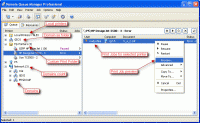
Remote Queue Manager is a professional tool to manage print jobs. There is no need to install any drivers to control a remote printer. Remote Queue Manager allows you to visually preview documents in the spool.
Every time you use the "Print" function in one of your applications, the information goes to a spool on your hard disk before being sent to the printer. If you are printing several documents, they form a print queue. Even if you have only one printer directly connected to your computer, it's easy to get into a mess. Print jobs have a lot of complicated parameters. Simply by selecting a wrong page size/orientation, a wrong color or a page collating mode, you can end up with tons of wasted paper, ink, time and nerves. Worst of all is that the documents themselves have a tendency to contain typos. Required corrections always come to your attention only after sending a document to the printer.
In offices where several people share the same printer across a network, this problem appears often and a good reliable tool to manage the printer queue is a must. Unfortunately, standard methods of printer queue management offered in Windows are rather limited.. You have to distinguish jobs by their not very descriptive names and usually "Cancel" is the only action available. In addition, to control a remote printer's queue, you need to install its drivers on your local PC.
Remote Queue Manager is a professional tool to manage print jobs. There is no need to install any drivers to control a remote printer. The program uses the remote computer's drivers. Instead of searching through non-descriptive job names, Remote Queue Manager allows you to visually preview documents in the spool. You can easily connect to a remote printer cancelling unwanted jobs or changing the priority for others. The program also allows you to view properties for every printer job (paper size and orientation, printing preferences etc).
Do you have more than one printer in your network? If so, that's NOT a problem. Remote Queue Manager helps you control all the printers in your organization, right from where you sit. Whats new in version 5.20.173: [+] Added command "Queue manager only" (Available from main menu Options).
[*] Printer folders creation fixed.
[*] Improved stability. Requirements: A standard Windows 2000/XP/2003/Vista/2008 Operating system: WinXP,Windows2000,Windows2003,Windows Media Center Edition 2005,Windows Vista Starter,Windows Vista Home Basic,Windows Vista Home Premium,Windows Vista Business,Windows Vista Enterprise,Windows Vista Limitations: No limitations Release notes: Major Update
Print Helper is the ideal solution for batch printing and conversion Excel, PDF, Word image and other files. Unique features: automatic Excel, Image resizing; mulipage TIFF, FTP client; MS Publisher and batch ZIP support. Free download.
Price: $149.99, Rating: 9.89, Downloads: 196 Download
PrintMonitor is a perfect software tool for print devices management. It is used as a monitoring and statistics gathering software system for large organizations, printing businesses and internet cafes.
Price: $119, Rating: 8.2, Downloads: 188 Download
On This Day in History (Day You Were Born, Married, Christened etc.) Software has been developed for the UK (England, Northern Ireland, Scotland and Wales), USA and Australian markets and covers every day from the year 1900 to the present day
Price: $30, Rating: 6, Downloads: 174 Download
Checks that your default printer is the one you want and not that one in the Business Centre where you were working yesterday, so the confidential report you are about to print need not be read by all your colleagues or competitors.
Price: $14.95, Rating: 5, Downloads: 163 Download
This utility lets you know the paper size, printable area size and all margins in pixels, millimeters and inches for any of
your printers.
Those may be very important parameters if you want to get the most out of your printer!
Price: $0, Rating: 9, Downloads: 158 Download
User Rating
Rating:2.2 out of
5 Based on13 ratings.
13 user reviews.

 Remote Queue Manager Personal 5.20.173 details